Chair Tai Chi App: Guided Seated Practice on iPhone and iPad
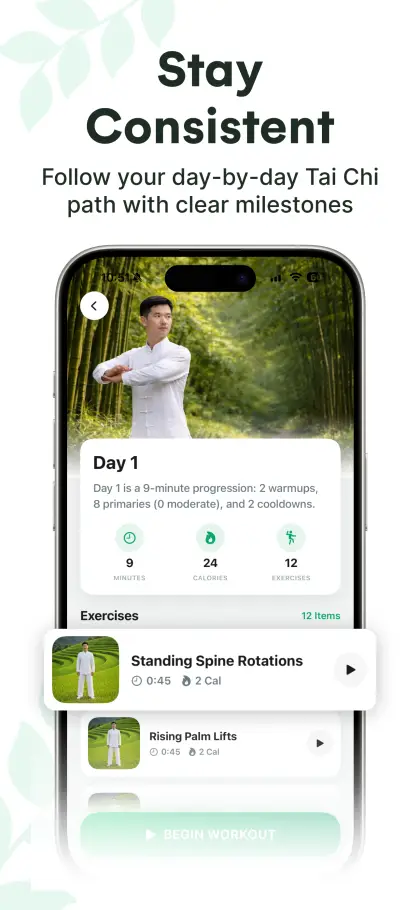
A good chair Tai Chi app gives you a program that stays seated, a video demonstration you can see clearly and a session to follow each day. Tai Chi Beginners & Seniors, the app we make, includes a Chair Tai Chi program with step-by-step video and voice guidance, organized into daily plans on iPhone and iPad.
The same app also has Tai Chi and Tai Chi Walking programs, so you can add standing or stepping practice later without switching apps.
Download Tai Chi Beginners & Seniors. Free download with in-app purchases; a subscription is needed for access to every session.
What to check in a chair Tai Chi app
- The program stays seated. Some routines labelled “chair” use the chair only for support while you stand. If you need to remain seated, watch a session through, including the transitions.
- You can see the movement. Hands, shoulders and any leg movements should stay visible on the screen you will use.
- There is a clear next session. A daily plan saves you from searching for what to practice each time.
- You can reach the controls. You should be able to pause or replay without getting up.
- The purchase terms are plain. Know which sessions are included and whether the payment renews.
Our chair Tai Chi guide explains seated versus supported standing practice in more detail, with a lesson checklist you can use with any app.
Want to try it before you download anything? Follow our free 10-minute chair Tai Chi routine.
How our app handles chair practice
Chair Tai Chi sits next to the Tai Chi and Tai Chi Walking programs in Tai Chi Beginners & Seniors. You follow a video demonstration with voice guidance, and the daily plan gives you a session to come back to. Start with a stable chair and place your screen where you can see it comfortably.
The app supports iPhone and iPad with iOS or iPadOS 16 or later. An iPad gives you a larger view if you sit a little further from the screen.
We do not claim that seated practice produces a particular health result. NCCIH’s Tai Chi overview summarizes research on Tai Chi in general, not on a specific seated routine or app. If a condition, injury or recent surgery affects how you move, ask your doctor or a physical therapist which movements suit you.
Open Chair Tai Chi in Tai Chi Beginners & Seniors. Review the access offer in the app before subscribing.
Questions about chair Tai Chi apps
Is there a free chair Tai Chi app?
Ours is free to download with in-app purchases. The official listing says access to every session needs a subscription and that some plans include a free trial; check the offer shown to you. Our guide to free Tai Chi apps explains what “free” can mean.
Can I do chair Tai Chi in a wheelchair?
That depends on the session and the adaptations you need. Ask an instructor or therapist experienced with wheelchair adaptations before assuming a chair routine suits you.
Does the app work on iPad?
Yes. Tai Chi Beginners & Seniors supports iPad with iPadOS 16 or later, as well as iPhone with iOS 16 or later.
What if I want to practice standing later?
The app also includes Tai Chi and Tai Chi Walking programs. Those involve standing and stepping, so choose them when those movements suit you.
Start seated practice today
Download Tai Chi Beginners & Seniors on the App Store and open the Chair Tai Chi program on your iPhone or iPad. The download is free with in-app purchases.
Product information comes from the official US App Store listing, checked 9 November 2026. This page does not claim clinical testing of the app.