Tai Chi App vs YouTube: Which Fits Your Home Practice?
Choose a Tai Chi app when you want a program to return to; choose YouTube when you want to explore teachers or follow a particular video series. For beginners wanting guided daily practice with chair and walking options, we recommend Tai Chi Beginners & Seniors, the app we make. Its value is having a practice plan ready when you open it.
Download Tai Chi Beginners & Seniors. Free download with in-app purchases; a subscription is needed for access to every session.
If access and price are your main questions, our free Tai Chi app guide explains downloads, trials and subscriptions.
Start with the problem you want to solve
An app and a video platform can both put instruction on your screen. The useful difference is what happens before you press play and when you return tomorrow.
If you keep searching for a new beginner video, decide whether you want that freedom or would prefer a planned session. If you already follow an instructor’s connected series, look at what an app would add to that routine before changing it.
For learning a named traditional form, ask which style and sequence the course teaches. For general home practice, focus on the demonstration, the format you want and whether you can follow the explanation. Our beginner Tai Chi guide covers choosing an appropriate starting format.
Tai Chi app and YouTube compared
This compares our app’s published offer with ways to organize YouTube videos. It is a choice guide, not a hands-on rating of every app or channel.
| Your decision | Tai Chi Beginners & Seniors | YouTube lessons |
|---|---|---|
| What will I follow? | A daily session plan with guided video | A video or series you choose; an instructor may provide a connected course |
| Can I choose a practice format? | Tai Chi, Chair Tai Chi and Tai Chi Walking programs | Check each lesson or series for the positions and movements it includes |
| How do I organize my next visit? | Return to the app's daily plan | Save a series or make an ordered playlist |
| Which device? | iPhone or iPad, requiring iOS or iPadOS 16 or later | Check YouTube playback and the lesson's readability on your preferred screen |
| What access should I check? | Free download with in-app purchases; subscription for all sessions | Check whether your selected videos or course require payment |
YouTube can support an organized routine: its official playlist guide explains how to save and reorder videos. A well-chosen playlist may suit you better than searching again every day.
What to look for in a lesson preview
Evaluate the lesson itself before choosing between platforms. A useful preview lets you answer these questions:
- Can you see the whole movement, including the feet when stepping is involved?
- Can you understand the explanation while looking toward the screen?
- Does the session stay seated, include standing, or involve walking?
- Is it clear whether you should repeat this lesson or continue to another one?
- Can you operate the playback controls comfortably on your device?
If you want to revisit part of a movement, check how the actual player handles it. Playback tools vary; do not assume a course has segment looping or slow-motion controls just because it uses video.
When our app is the useful next step
Our recommendation is strongest when you want guided daily Tai Chi with a choice of practice formats, rather than another collection of videos to sort. The official app description lists daily plans and video with voice guidance.
Choose a format deliberately. Our chair Tai Chi guide explains seated versus supported standing practice; our Tai Chi walking guide explains the stepping focus.
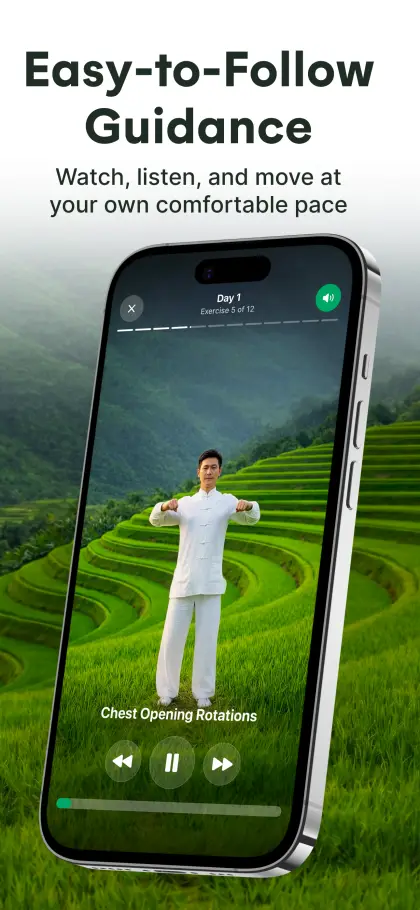
Explore the app’s guided daily practice. Free download with in-app purchases; review the subscription offer before buying.
Make the choice around your next session
Try this practical decision: can you already name the lesson you will open next? If you can, and the instruction suits you, you have a starting routine. If you spend your practice time comparing videos, a daily program may be the more useful choice.
You can also use the two resources together: keep one main program and use other videos to explore a topic. If demonstrations differ, return to the instructions for the sequence you are learning rather than combining steps from unrelated lessons.
Neither a prerecorded app lesson nor a prerecorded YouTube video observes your movement. For individual correction or a specific traditional form, look for an instructor who can give feedback.
Questions about apps and YouTube
Can I learn Tai Chi from YouTube?
You can follow recorded lessons and connected series on YouTube. Choose instruction that explains the practice and its progression; seek individual feedback when you need someone to check your movement.
Is a Tai Chi app worth paying for if videos are available?
It can be, if the daily plan and practice formats solve a problem you have. Compare those benefits with the video series you would actually use, then check the purchase offer.
Does YouTube have structured Tai Chi courses?
An instructor can publish a connected series, and you can save or organize videos in playlists. Check the order and beginner entry point rather than treating every search result as a course.
Which should I choose for seated practice?
Choose a lesson that explicitly stays seated and shows the transitions you will follow. Our app includes a Chair Tai Chi program; a YouTube lesson should be checked individually for its format.
Can I use Tai Chi Beginners & Seniors on an iPad?
Yes, the official listing supports iPad and iPhone with iPadOS or iOS 16 or later. Position the screen so you can see the demonstration before starting.
Should I use several Tai Chi apps at once?
Start with one main program so you know what to return to. If you are still deciding which teaching format suits you, use our Tai Chi app buyer’s shortlist to compare a few options.
Choose a program you will return to
If you want guided daily practice with chair and walking options, download Tai Chi Beginners & Seniors on the App Store. The download is free with in-app purchases; review session access in the app.
Sources and approach
Product information was checked against the official US App Store listing. Playlist organization is documented in YouTube Help. Sources checked 9 November 2026; this guide compares published formats and practical selection criteria rather than claiming independent testing or a universal winner.